
Tech accessories.
Check the connection.
A USB-C port does not tell you its video or charging capabilities. A battery headline does not tell you the listening mode used. Use this page to narrow down chargers, audio and laptop accessories by those details.
Find your next upgrade ↓
Tech essentials to explore.
As an Amazon Associate I earn from qualifying purchases. These are research-based product selections, not hands-on reviews or confirmed discounts. Check Amazon for current prices, availability, variants, shipping, and returns.
Anker Nano 30W USB-C Charger

Charge one device at a time; compare the 30W ceiling with its power requirements.
View on AmazonSoundcore Q20i Headphones — Blue
Compare ANC-on battery figures and check whether wired mode supports the features you need.
View on AmazonSoundcore P30i Noise-Cancelling Earbuds

Check ear-tip fit before giving weight to the case’s phone-stand feature.
Why it made the shortlist
The retrieved Amazon listing showed #3 in Earbud & In-Ear Headphones. This is a ranking snapshot, not a live position or a claim of hands-on testing. Rankings and availability change. Research checked October 17, 2026.
Logitech M510 Wireless Mouse
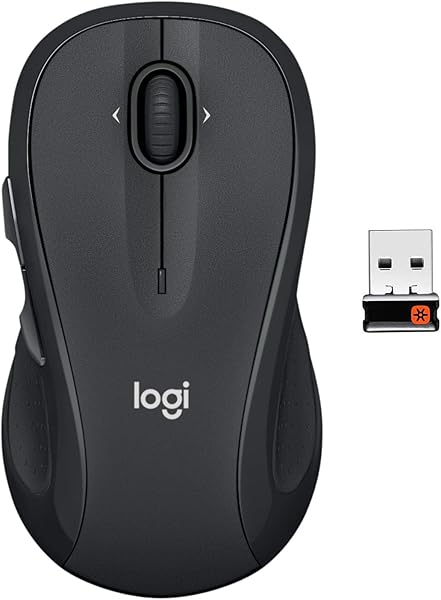
Check that your computer can accept the USB receiver.
Why it made the shortlist
The retrieved Amazon listing showed #16 in Computer Mice. This is a ranking snapshot, not a live position or a claim of hands-on testing. Rankings and availability change. Research checked October 17, 2026.
A closer look at everyday audio.
Practical buying advice based on manufacturer information. These articles contain affiliate links and do not claim hands-on testing.

Soundcore Q20i Headphones: What to Check Before You Buy
A practical look at fit, noise-cancellation features, and battery claims.
Read the guide ↗Soundcore Q20i vs P30i: Headphones or Earbuds for Your Day?
Compare formats, carrying space, and charging routines before choosing.
Read the comparison ↗What would you like to improve?
Choose charging, audio or workspace accessories to find the checks relevant to that equipment.
Charging & power
Chargers, cables, and portable power for your daily devices.
See the buying checklist ↓Headphones & earbuds
Compare comfort, listening needs, calls, and portability.
Explore audio essentials ↓Workspace accessories
Stands, hubs, and accessories that fit your setup.
Plan your workspace ↓Connections, listening and desk fit.
Start with compatibility.
A connector that fits does not tell you everything about charging performance.
- Match your device: Check its manufacturer’s charging requirements and supported charging protocols.
- Check the whole setup: Your device, charger, and cable need to support the charging mode you want.
- Read multiport details: Look for how a charger shares power when more than one device is connected.
- Choose a credible seller: Confirm manufacturer details, warranty terms, and return options. Avoid relying on an “original” label alone.
Comfort comes first.
The right choice depends on where you listen and how long you wear it.
- Pick the format: Consider earbuds for portability or over-ear headphones for your preferred fit.
- Think about your environment: Compare isolation and awareness features for your actual listening spaces.
- Check call needs: Look for microphone examples or reliable call-quality information if you take frequent meetings.
- Read battery claims carefully: Note the settings used for the advertised figure and whether it includes the charging case.
Build around your setup.
Measure, check connections, and choose accessories that solve a real problem.
- Laptop stands: Check device size, weight limits, stability, adjustment range, and desk space.
- USB hubs: Check your computer’s port capabilities and the hub’s display, data, and charging specifications.
- Keyboards and mice: Consider layout, connection options, hand comfort, and your daily work.
- Desk organization: Measure cable lengths and available space before adding mounts or storage.
Compare what matters.
| If your priority is… | Look closely at… | Check before buying |
|---|---|---|
| Charging several devices | Port types and shared power output | Output with all your devices connected |
| Everyday calls and music | Fit, controls, and microphone performance | Device compatibility and return conditions |
| A cleaner work desk | Dimensions, mounting options, and cable routing | Available desk space and device measurements |
| A portable setup | Weight, size, durability, and connection needs | What you need to carry alongside the accessory |
Questions about compatibility and ordering.
How do I know an accessory will work with my device?
Check your exact device model against the accessory manufacturer’s specifications. Match the port, operating-system requirements, supported features, and any power requirements. Ask the manufacturer if compatibility is unclear.
Should I choose the cheapest option?
Compare the full value: suitability, build quality, warranty, seller reliability, delivery cost, and returns. A low price is useful only when the product meets your needs.
Does ProDealsSpot sell or ship the products?
ProDealsSpot is a product-discovery and affiliate-content website. Purchases made through retailer links are handled by the retailer, including payment, delivery, returns, and warranty support.
Where are the current prices and offers?
Check the retailer’s product page for the current price, stock, delivery charges, and offer conditions before purchasing. Prices and availability can change.
Affiliate disclosure: Some links may be affiliate links. If you purchase through them, we may earn a commission at no extra cost to you. Check current product specifications, prices, and terms with the retailer before buying.
More options for your laptop setup.
As an Amazon Associate I earn from qualifying purchases. Research-based selections using product listing details; not hands-on testing. Check current price, condition, seller, stock, and selected variant on Amazon.
Anker 332 USB-C Hub (5-in-1)

Confirm video support on the laptop port; a USB-C connector alone is insufficient.
View on Amazon ↗Logitech Pebble Mouse 2 M350s — Black

Check Bluetooth and software support on every device you plan to pair.
View on Amazon ↗One more connected-home option.
As an Amazon Associate I earn from qualifying purchases. These selections use Amazon listing popularity indicators, with source age stated on each card. They are not a live trending chart, verified discounts, or hands-on tests. Check the exact variant, seller, current price, stock, shipping, and returns on Amazon.
Amazon Smart Plug — Works with Alexa

Check US supply requirements and the load rating of the connected appliance.
Why shortlisted: The retrieved Amazon listing displayed “10K+ bought in past month.” Retrieved October 19, 2026; the search source was crawled today. This is Amazon’s displayed purchase-band indicator, not an audited sales total or a category rank.
View on Amazon ↗Tech accessories for your US home office and daily carry
Compare USB-C chargers, laptop hubs, wireless mice, and noise-canceling headphones by the job they need to do. For US purchases, check plug type and voltage, laptop port support, included cables, and the exact Amazon.com model. A compact charger is useful only when its charging profiles match your device.